MagieCRM for plumbing companies
MagieCRM fits a plumbing shop that wants the office in one place: new calls, estimates you're waiting on, jobs in progress, invoices, and who you owe a call. If you need a dispatch board, texting, or quotes customers approve online, Housecall Pro or Jobber will suit you better.
We checked this page against MagieCRM and the competitors' pricing pages on October 1, 2026.
What a plumbing shop would track
Nothing comes pre-built. You set up your own lists (MagieCRM calls them trackers), the stages a job moves through and its fields, or ask Magie, the built-in assistant, for ideas. A four-person shop might use:
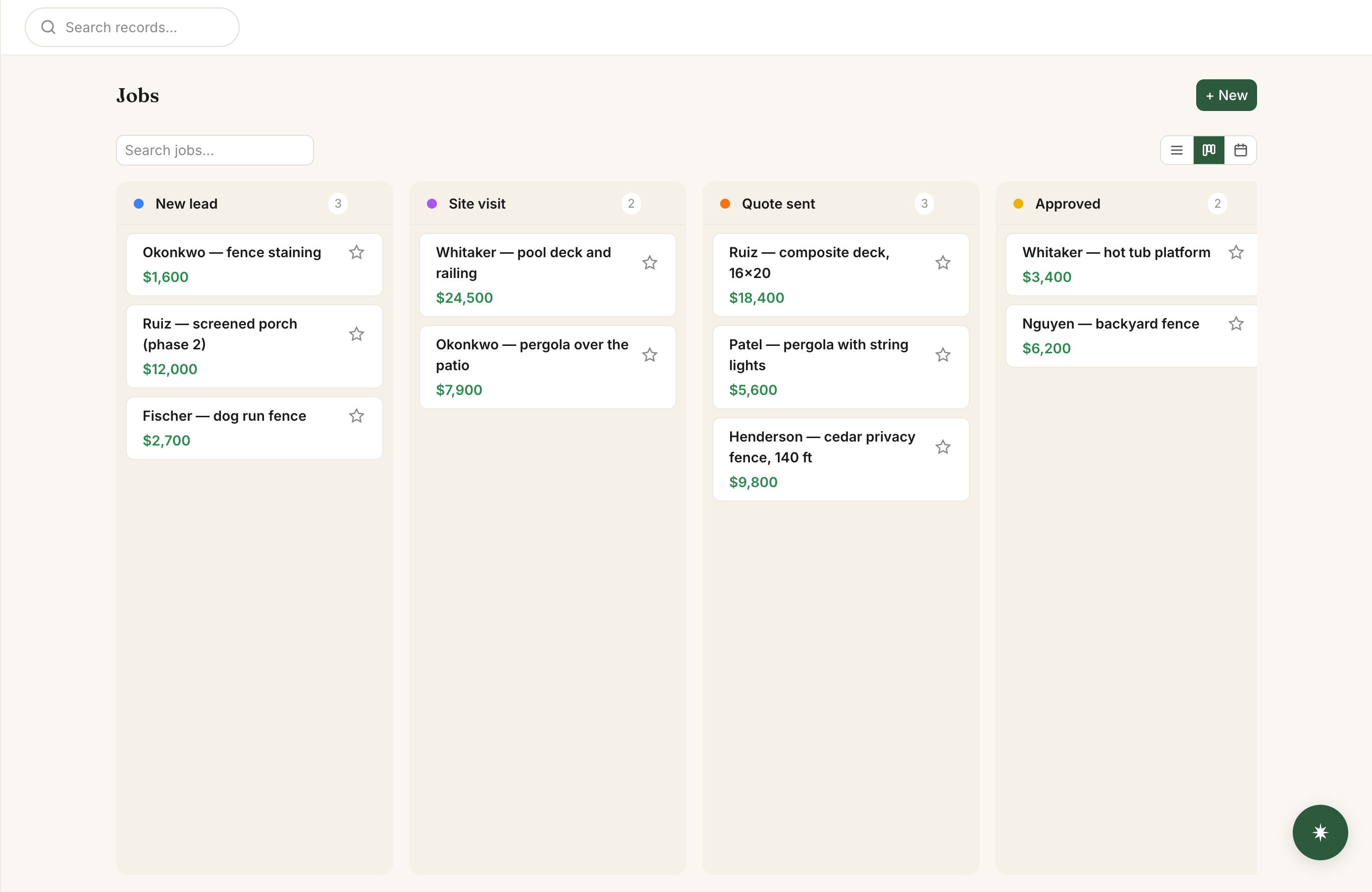
What it does for a plumbing office
Typing up a tech's call
When a tech calls from the truck, type what they say into Scratchpad, the box at the top of the To-dos card on your dashboard: "Ortiz water heater is 14 years old, wants a replacement price, call her Thursday at 2." Magie finds the Ortiz job, puts 14 in Water heater age and adds a to-do for Thursday at 2. Nothing is saved until you approve it.
Estimate follow-ups
Tell Magie the rule: "If a job sits in Estimate sent for 3 days, email the customer my estimate follow-up and add a to-do to call them." It sends only the email you wrote, to the Customer email on the job, not the one on the customer's record. Put the email on every job.
A booking page for estimate visits
Customers pick a time during your hours and get email reminders a day and an hour before. The booking shows up in your To-dos and on the Meetings page. It doesn't create a job or move one to Visit booked.
A service request form for your website
At 10pm someone wants a price on a new water heater and fills in the request form on your website. Have the form fill in Customers: someone new becomes a customer, and a repeat customer with the same email or phone goes on their record. It doesn't open a job. Send it to Jobs instead and a repeat customer's request lands on their old, finished job.
Photos of paperwork
Photograph a handwritten work order or supplier quote from inside a job and Magie fills in the fields it can read. You check them before saving.
Yearly maintenance jobs
Keep maintenance plans in their own tracker, and a yearly recurring job makes a water heater flush job for every plan on January 1, and for a new plan when you add it. Each one is dated January 1, even if it's made in October, and lands in your first stage with only the plan linked, so you set the visit date and add the tech and customer email. Delete a cancelled plan, or next year's flush job still gets made.
Invoices and review requests
To send invoices you need your own Stripe account (a card processor, like Square). Customers pay by card online and MagieCRM takes no cut. A day after a job moves to Done, an automation can email the customer your Google review link.
Where MagieCRM falls short for plumbers
- No dispatch board. Jobs show on a month calendar, one person each, with no schedule by tech and hour and no dragging jobs between days.
- No text messages. Customers get booking reminders, estimate follow-ups and invoices by email.
- No quotes that customers approve online. An estimate is a stage, an amount and your own PDF attached to the job.
- No flat-rate price book. Products and services have one price each, with no cost or markup.
- No QuickBooks or Xero sync.
- No app to download. It runs in your phone's web browser and needs a signal.
- Invoices don't calculate sales tax. Add it as a line item. No deposits, partial payments, autopay or saved cards either.
What each costs for a four-person shop:
| Product and plan | Per month | Strongest points |
|---|---|---|
| Housecall Pro Essentials (5 users included) | $189, or $149 billed yearly | Dispatch board, estimates customers approve and e-sign online, texts and chat with customers, flat-rate pricing, job costing, routes, GPS, QuickBooks Online sync, iOS and Android app |
| Jobber Connect (5 users included) | $199 with no commitment, $149 billed yearly | Drag-and-drop schedule, client hub where customers approve quotes and pay, automatic card payments, progress invoicing, appointment reminders and one-click "on my way" texts, routing, GPS, QuickBooks Online and Xero sync, iOS and Android app |
| MagieCRM Starter plus 1 extra user | $114 | Stages and fields you name yourself, notes typed into Scratchpad filed on the right job, job fields read from a photo, automations you describe in plain English |
From each company's pricing page on October 1, 2026. Card processing fees are extra with all three. Jobber's two-way texting and job costing need Grow, $299 a month for 5 users ($229 billed yearly). Jobber and Housecall Pro offer 14-day free trials with no card. MagieCRM's needs a card but charges nothing until day 15. Full side-by-side: MagieCRM vs Housecall Pro.
What it costs
The first 14 days are free, with every feature working, email and campaigns included. You pick a plan and add a card at signup, and the card is charged for that plan on day 15, then monthly. Cancel before then and you pay nothing. If you cancel, you keep using it until the trial or paid month ends. Then the account turns read-only: you can sign in, look at everything and export it. Your data is kept 90 days, then deleted.
Starter is $99 a month for 3 people plus $15 for each extra person, so a four-person shop pays $114. Every plan has every feature, and monthly billing has no contract.
Starter holds 1,000 records. A record is one customer, job or maintenance plan, and every one counts, finished jobs and each year's flush jobs included. Two techs running 120 jobs a month, plus 30 new customers, add 150 records a month and fill Starter in under 7 months. Growth holds 10,000 records for $179 a month, about five and a half years at that pace.
Questions
Can MagieCRM text my customers?
No. Booking reminders, follow-ups, invoices and review requests all go by email. For texting, look at Housecall Pro or Jobber. On Jobber, two-way texting starts on the Grow plan.
Can I bring my customers over from Housecall Pro or Jobber?
Yes, if you can export them as a CSV or Excel file. MagieCRM suggests where each column goes and skips likely duplicates unless you check them. Every imported customer counts toward your record limit.
Does it work on a phone?
Yes, in your phone's web browser, and you can add it to your home screen. It doesn't work offline.
Try it with your own jobs
Email support@magiecrm.com with any questions and a person writes back within 24 hours.
Try it free for 14 daysCompetitor prices and plan features checked October 1, 2026: housecallpro.com/pricing, housecallpro.com/features/estimates, housecallpro.com/features/chat, getjobber.com/pricing. If you spot something wrong on this page, email support@magiecrm.com.