MagieCRM for painting contractors
MagieCRM is a CRM for the office side of a painting business: estimate visits, color consults, proposals waiting on an answer, deposit invoices and the touch-up call a year later. If you need customers to approve and sign proposals online, or you need texting, a crew schedule or QuickBooks sync, Jobber or Housecall Pro will suit you better.
Prices and features checked October 1, 2026.
What a painting company would track
You name your own lists, called trackers, and the stages a job moves through, or ask Magie, the assistant built into MagieCRM, to suggest some. A repaint company that also bids commercial work might set it up like this:
Give each project its own Customer email field. Automated emails go to the email saved on the project, not on the customer's record.
From estimate visit to touch-up call
Booking estimate visits online
Customers pick a time inside your hours and get an email reminder a day before and an hour before. You still create the project yourself, and the booking page can't see your Google or Outlook calendar.
Notes from the estimate or color consult
After the consult, type it into Scratchpad, the box at the top of the To-dos card on your dashboard: "Hargrove color consult done. Living room and hall in Agreeable Gray, eggshell, trim in Alabaster. Call her Friday." Magie finds the Hargrove project and offers to save the colors and add a to-do to call her Friday. Nothing is saved until you say yes.
Photos of your measurement sheet
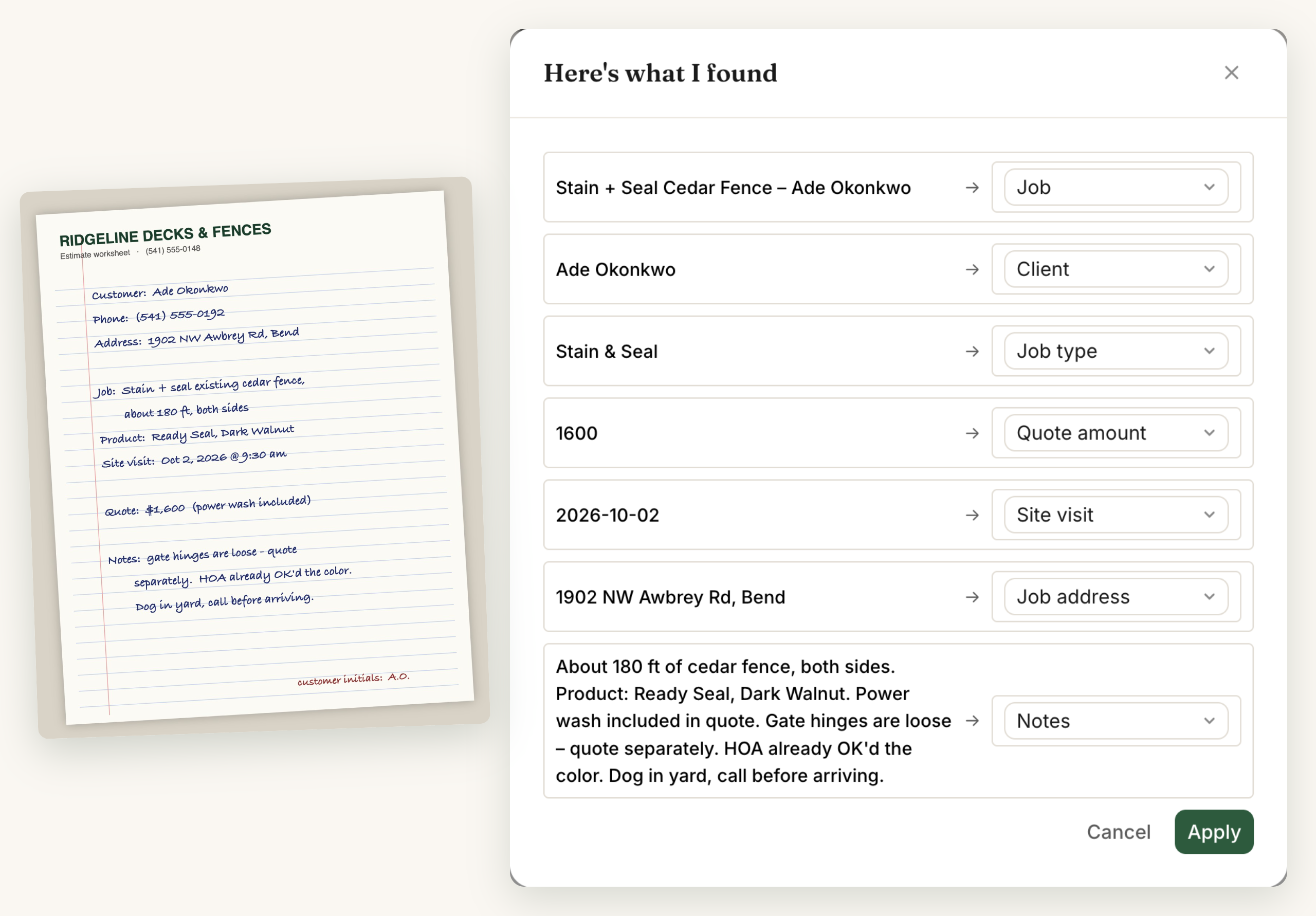
Photograph the sheet you filled out at the house and use Autofill: Magie reads the room sizes, wall square footage and price, and fills in the project's fields for you to check.
Follow-up emails on unanswered proposals
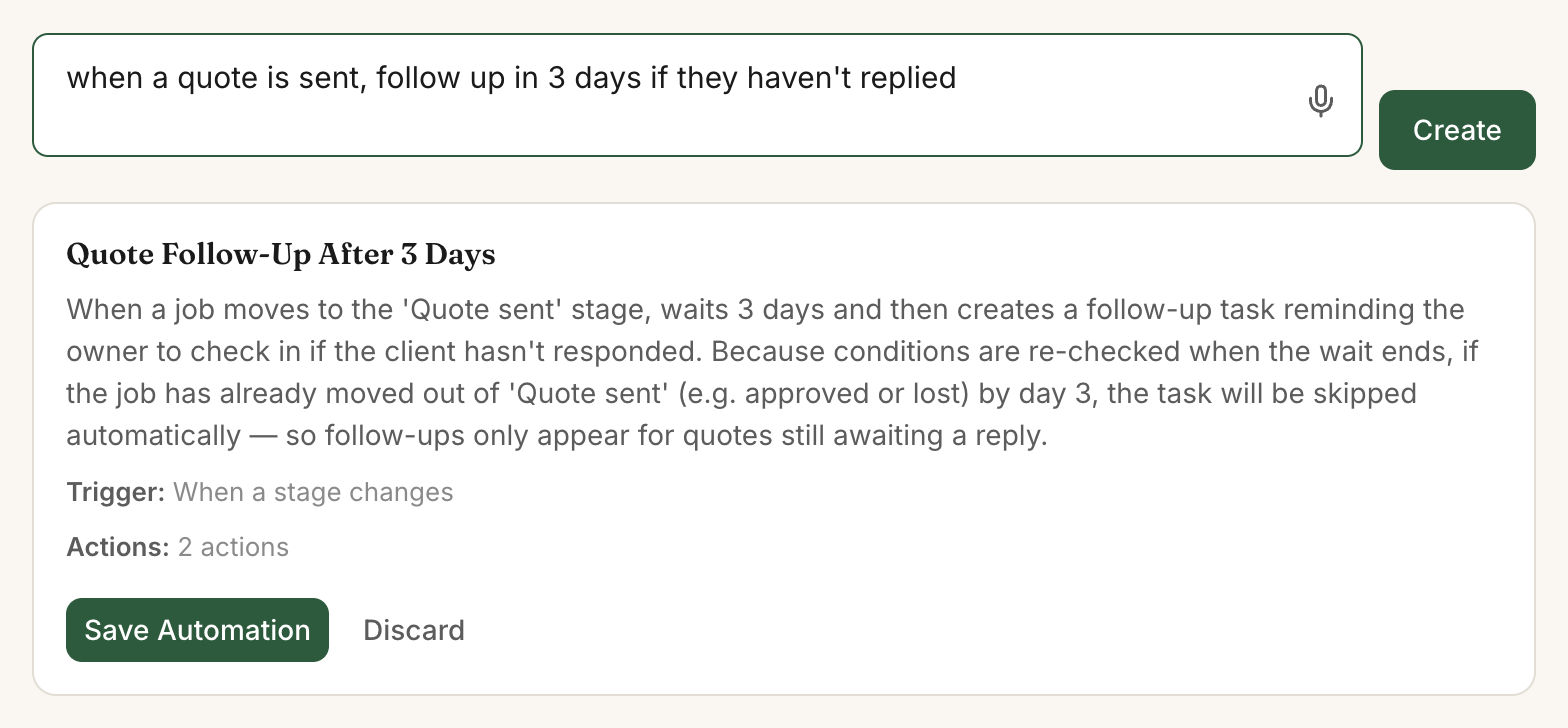
Describe the rule in plain words: "If a project sits in Proposal sent for 7 days and nobody's touched it, email the customer my proposal follow-up and add a to-do to call them." Magie shows you the rule first, and it only sends emails you wrote.
Deposit and balance invoices
On a $4,800 interior job with a one-third deposit, send a $1,600 invoice from the project and call the line item Deposit. The customer pays by card online through your own Stripe account, the card processor you connect to MagieCRM. After the walkthrough, invoice the other $3,200. MagieCRM takes no cut.
Review requests and the touch-up check a year later
A rule can email your review request, with your Google review link, when a project moves to Done. For the touch-up check, fill in Finished on when the job wraps and add: "365 days after a project's Finished on date, email the customer my touch-up check and add a to-do to call them."
Where MagieCRM falls short for painters
- No online approval or e-signature on proposals. You attach your own PDF.
- No measuring or estimating. Nothing calculates gallons, production rates or labor hours, so you'd price the job elsewhere and type in the total.
- No text messages. Everything goes by email.
- No crew schedule. Projects show on a month calendar by start date, one person per project, with no crew assignments or time slots.
- Deposits are separate invoices. No sales tax or autopay, and nothing tracks what's owed after a deposit. Jobber and Housecall Pro take the deposit online when the customer approves the quote.
- No QuickBooks or Xero sync.
- No App Store or Google Play app. It runs in your phone's browser and needs a signal.
Here's what Jobber and Housecall Pro cost for five people:
| Product and plan | Per month | What you get at this price |
|---|---|---|
| Jobber Connect (5-user tier) | $199 with no commitment, $149 billed yearly | Client hub where customers approve and sign quotes and pay, automated text and email reminders, autopay, custom fields, routing and GPS, QuickBooks Online sync, mobile app |
| Housecall Pro Essentials (5 users included) | $189, or $149 billed yearly | Estimates sent by text or email, scheduling and dispatch, price book, job costing, consumer financing, GPS, QuickBooks Online sync, mobile app with offline viewing |
| MagieCRM Starter plus 2 extra users | $129 | Trackers, stages and fields you name yourself, Scratchpad, filling fields from a photo, automations you describe in plain English, email campaigns (a $99-a-month add-on at Jobber) |
Two-way texting at Jobber starts on Grow, $299 a month for 5 users with no commitment or $229 paid yearly. Card fees are extra with all three: Jobber Payments charges 2.9% + 30¢, Housecall Pro starts at 2.59%, and MagieCRM invoices go through your own Stripe account at Stripe's rates.
What it costs
Starter is $99 a month for 3 people, and each extra person is $15 a month, so five people (owner, estimator, office manager and two crew leads) come to $129. Every plan has every feature, and monthly billing has no contract. You can export everything anytime.
Starter holds 1,000 records. Each customer, project and bid is one record, and it counts until you delete it, finished jobs and lost proposals included. Thirty estimates a month for new customers add 60 records (30 customers, 30 projects), so you'd hit 1,000 in month 17, sooner with commercial bids. Growth is $179 a month for 10 people and 10,000 records.
The card you add at signup is charged for your plan on day 15, then monthly. If you cancel, you keep using it until the trial or paid month ends. Then the account turns read-only: you can sign in, look at everything and export it. Your data is kept 90 days, then deleted.
Questions
Can customers approve or sign my painting estimate online?
No. MagieCRM doesn't write proposals. Attach your PDF to the project and move it to Proposal sent with the amount filled in.
Is there a free trial?
Yes, 14 days with every feature working, email and campaigns included. You pick a plan and add a card at signup, and the card is charged for that plan on day 15. Cancel before then and you pay nothing. Jobber and Housecall Pro offer 14-day free trials with no card.
Can MagieCRM text my customers?
No. Booking reminders, proposal follow-ups, invoices and review requests all go by email. If your customers expect texts, it isn't the right tool.
Try it with your own estimates
Put this week's estimates and open proposals into it. Questions first? Email support@magiecrm.com and a person writes back within 24 hours.
Try it free for 14 daysCompetitor prices checked October 1, 2026: getjobber.com/pricing, housecallpro.com/pricing. Features checked the same day in their help centers: Jobber's Connect plan, quote approvals and deposits on quotes, and Housecall Pro's e-signatures on estimates and deposits on estimates. Spotted something wrong on this page? Email support@magiecrm.com.